Products are what you rent (or sell). This guide covers how to create them, how to import a full catalog, how to set their price and how to track their inventory.
Create a product
- Go to Products in the sidebar.
- Click New Product.
- Fill in the form, which is split into four sections: Identity, Pricing, Inventory and Advanced.
- Save.
At minimum you need a name and a rental price. You can assign it a category to organize your catalog (categories are managed in Categories).
Rental price and billing period
The rental price is charged based on the billing period you choose for each product:
- Per hour
- Per day
- Per week
- Per month
Import products from Excel or CSV
If you already have your inventory in a spreadsheet, you do not need to enter it again.
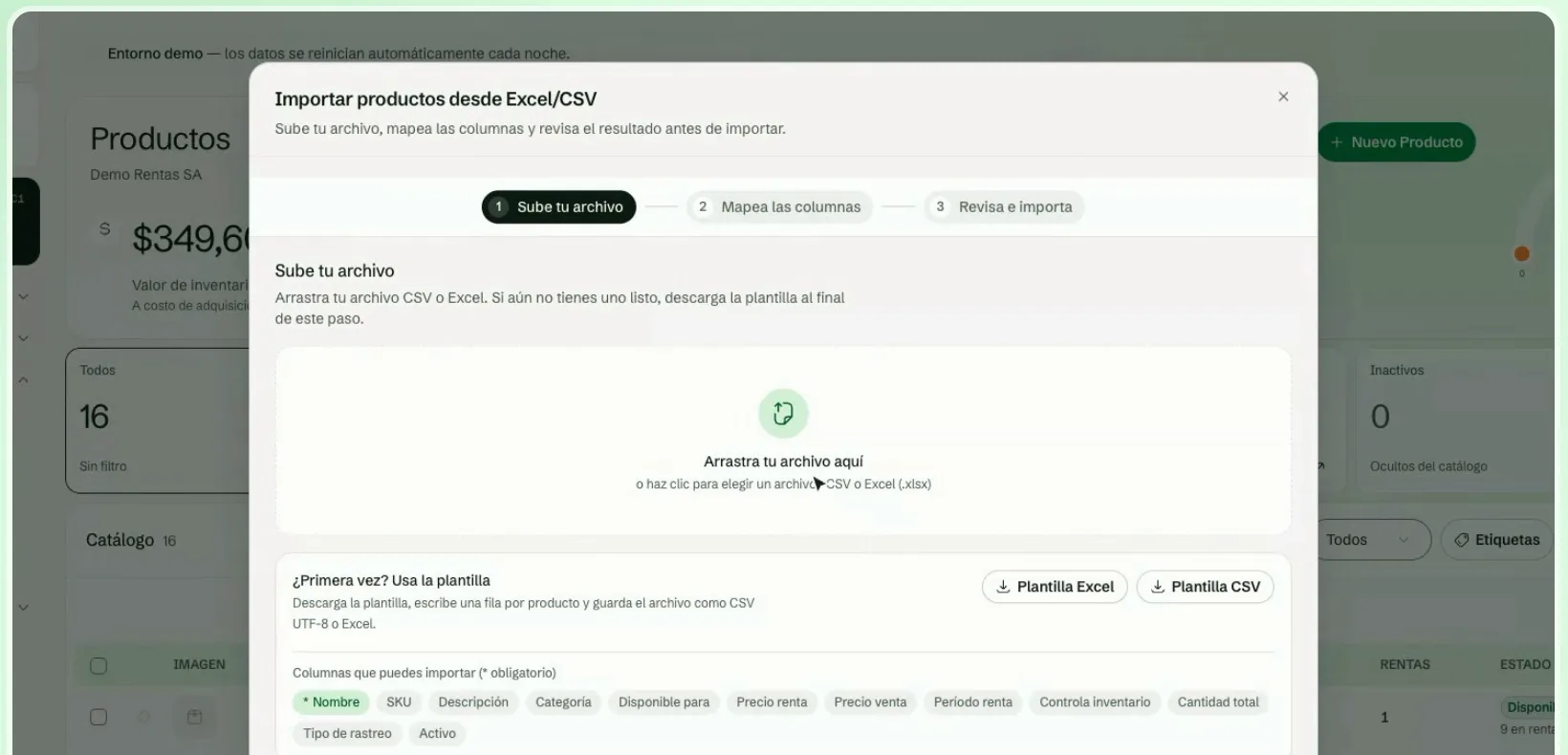
- In Products, click Import.
- Upload your file. It accepts CSV or Excel (.xlsx). If you do not have one ready, download the template (Excel or CSV) and write one row per product.
- Map the columns. Match each Leaxio field to a column in your file. Fields marked with an asterisk (*) are required.
- Review and import. Leaxio validates your file and shows you how many rows are valid and which ones have errors. Only rows without errors are imported.
If a row has errors, the summary tells you what the problem is (for example, an invalid rental price). Fix the file and upload it again, or adjust the mapping.
Availability
Each product shows how many units are free right now, and on its page you can check inventory and operations per day. To see future availability, use the Calendar: it shows pickups and returns by day and lets you filter by product.
Rental, sale or both
In each product's form you indicate whether it is available for Rental, for Sale or both. A rental returns to inventory when the period ends; a sale is deducted permanently. Products with a sale price can be sold from Sales.
Track your inventory
Each product has a tracking type:
- Aggregated (total quantity): for products without a serial number, such as chairs, tables or glasses. Leaxio only keeps the total quantity available.
- Serialized (individual units): for equipment with a serial number, such as laptops, cameras or vehicles. Each unit is tracked with its own status and serial number. You can add several units at once by pasting a list of serials or generating a series with a prefix and a starting number.
With Track Inventory you decide whether Leaxio keeps the product's stock.
Keep going with
- Rental forms: ask for extra data when a product is rented.
- Scanner and labels: add products with a reader or camera and print labels.
- Packages: product bundles with their own price.
- Maintenance: record inspections and repairs.
- Additional services: delivery, installation and other charges.
- Public catalog: share your products with your customers.